When something's wrong
Nothing here is destructive. You can run all of it while confused.
Stop first
Section titled “Stop first”If she is doing something you did not intend, or you just want everything to hold still:
waffle pauseNew work stops. Nothing is lost, nothing is deleted. waffle resume picks up
where you left off.
In a conversation, Escape or Ctrl+C cancels the current turn without
stopping anything else.
The three questions
Section titled “The three questions”Almost every problem is one of these.
“She won’t answer me”
Section titled ““She won’t answer me””Nine times in ten this is a model provider that is not connected, which is the Installed but not Ready state from Bringing her home.
waffle doctorIt checks the installation over and names what is missing. If it points at a
provider or a model, run waffle setup again — completed steps are skipped, so
you land on the one that did not finish.
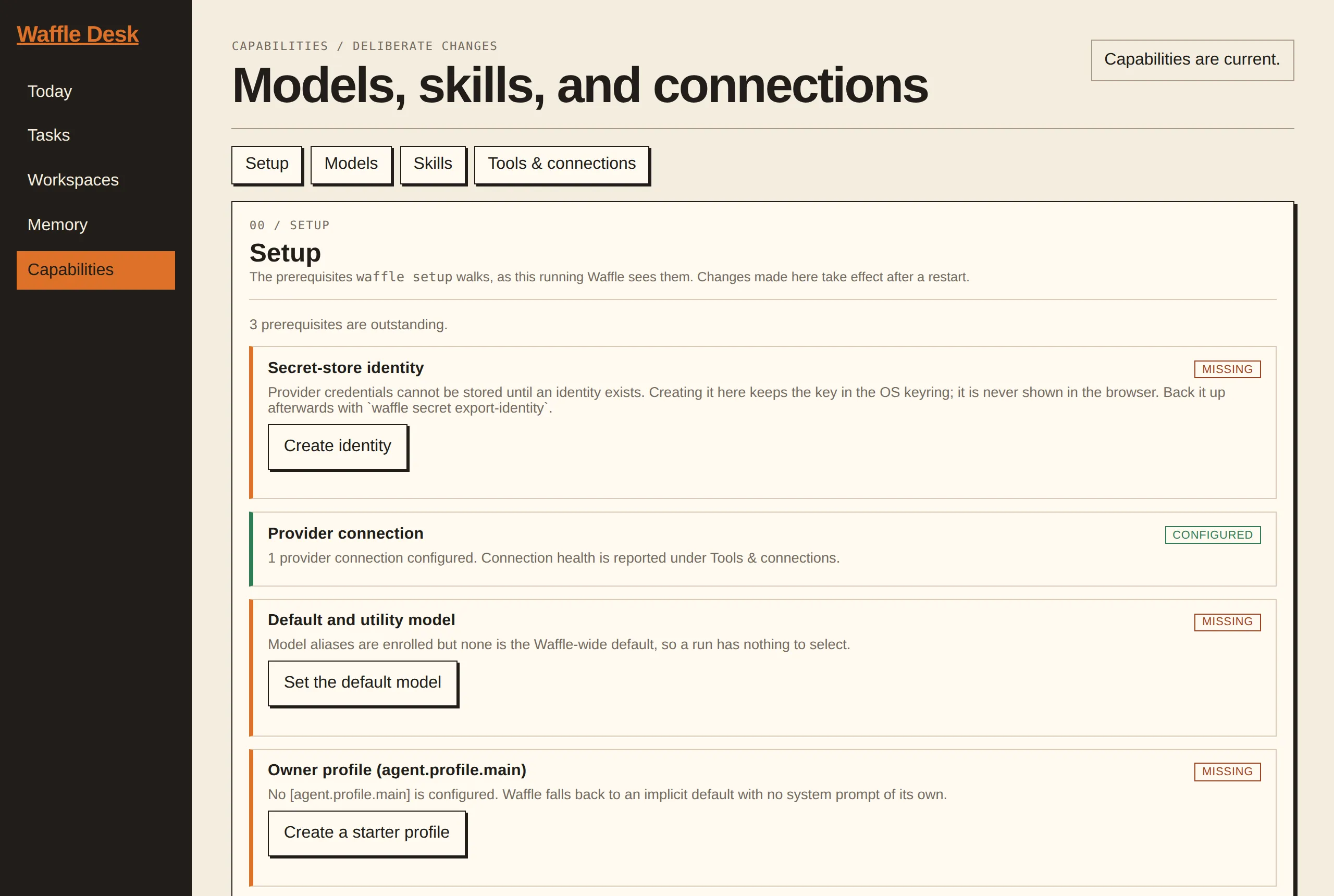
If you have Waffle Desk enabled, its Capabilities view answers the same question with a checklist, marking each prerequisite configured or missing and offering the fix inline where it can:
If she used to answer and now does not, check the model still exists:
/modelsA model alias removed from your configuration leaves chat blocking turns and
showing the unavailable name, on purpose, so a silent substitution never
happens. Pick another with /model <alias>.
“She won’t do the thing I asked”
Section titled ““She won’t do the thing I asked””Usually a permission, not a failure. In chat:
/permissionsThat shows exactly what she is allowed to do right now, including the sandbox mode. If the tool she needs is denied, or the profile is a restricted one, that is your answer.
/statusShows which profile you are actually in — easy to be in a restricted one
without realising, particularly after waffle chat --profile something.
“Something ran that I did not expect”
Section titled ““Something ran that I did not expect””waffle status # active and recent runswaffle usage # what has been spentwaffle session ls # past conversationsEvery permission decision is recorded, so “what did she ask to do, and what was the answer” is always answerable after the fact.
Scheduled jobs that never ran
Section titled “Scheduled jobs that never ran”Cron jobs only fire while the background service is running. If waffle serve
is not up, nothing scheduled happens — no error, just silence.
waffle cron ls # jobs, next run, last statuswaffle cron run <id> # run one now and watch itRunning one by hand is the fastest way to tell a broken job from a service that was not running.
Running as a managed service
Section titled “Running as a managed service”On a host where Waffle runs as a system service, the units are the first place to look:
systemctl status waffle.service waffle-chat.socketjournalctl -u waffle.service -u waffle-chat.socket --since '15 minutes ago'Getting back to a known-good state
Section titled “Getting back to a known-good state”Take a backup before anything drastic:
waffle backup /absolute/path/to/backup-dirThe encryption identity is not included by default — export it separately with
waffle secret export-identity and keep it somewhere else, or the backup cannot
be decrypted. A backup you cannot decrypt is not a backup.
Restore with:
waffle restore /absolute/path/to/backup-dirIf you updated her and things got worse:
waffle rollbackThat puts the previous binary back.
When it is genuinely broken
Section titled “When it is genuinely broken”Waffle is a developer preview: config keys, flags, and stored data can still change between releases. If something looks like a real bug, the project takes reports from people who actually ran it. Security problems go through the project’s private reporting process, never a public issue.
Nerd corner: How it fits together — health checks, the serve lock, and what state lives where.